
Navisphere Carrier
C.H. Robinson Worldwide, Inc.Maps & Navigation
4.5698.00 Reviews
- Version
- 2.30.1
- Installs
- 100.00K
- Age Rating
- Everyone
Screenshots
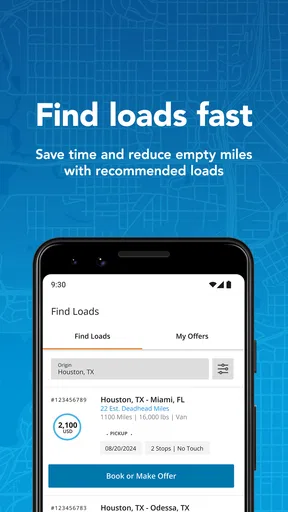
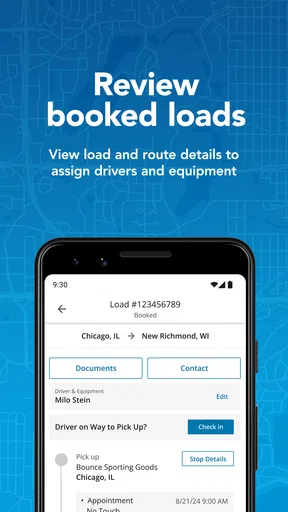
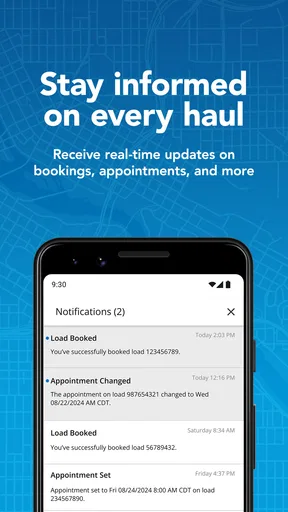
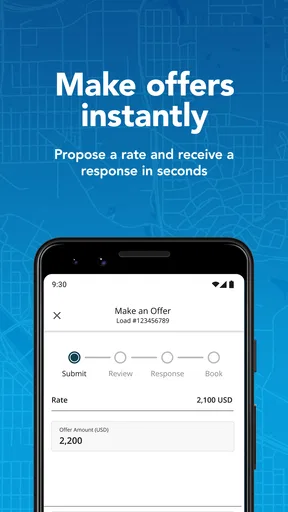
Our Review of Navisphere Carrier
 Analysis by Appyee
If you are an owner-operator or a small trucking business looking for freight, Navisphere Carrier is worth understanding before you decide whether it belongs in your daily workflow. I approached it as a practical Maps & Navigation app rather than as a general driving tool, and that distinction matters. Its purpose is to help carriers find, book, and track truckloads through the Navisphere load board experience, not to replace the turn-by-turn navigation app you already use on the road.
My first impression is that the app makes the most sense when you want to turn a freight search into a manageable sequence: look for a suitable load, review the opportunity, arrange the booking, and keep an eye on the shipment afterward. That is a more focused job than simply browsing a map. If you are new to carrier load boards, the interface may feel more businesslike than familiar consumer navigation apps, but the workflow becomes easier once you stop expecting it to behave like a road atlas.
The app is free and carries an Everyone content rating, which makes it approachable from an access standpoint. It was developed by C.H. Robinson Worldwide, Inc., and its presence on Android is established, with over 100 thousand installs and an average rating of 4.5 from around 1.6 thousand ratings. Those figures suggest that it has found a real audience among people who need carrier-focused freight tools, although popularity alone should not decide whether it fits your operation.
What to expect before you start
The most important expectation to set is this: Navisphere Carrier is not a replacement for Google Maps, Apple Maps, or a dedicated truck-routing product. Those tools are built around roads, directions, traffic, and places. This app is built around the commercial side of moving truckloads. I would use a navigation app for the route itself and use Navisphere Carrier for the freight-related steps surrounding that route.
That separation can actually be helpful. When one app tries to handle every part of trucking, important details can become buried under map controls and general-purpose search results. A carrier-focused load board gives the freight search its own space. You can think in terms of origin, destination, timing, and whether a load makes sense for your next move instead of starting with a map pin and working backward.
For a first-time user, the app is most useful when you already know what kind of work you are seeking. Before opening it, have a rough idea of your available equipment, the areas you are willing to serve, and whether you are searching for a load to begin a trip or to reduce empty miles after a delivery. That preparation makes the first session more productive than simply scrolling through every available possibility.
I also recommend treating the load board as a decision tool rather than an automatic answer. A load that looks attractive at first may not suit your schedule, equipment, or next destination. The app can bring opportunities together, but you still need to check the practical fit yourself. That is one of the central trade-offs: the convenience of a mobile freight search is valuable, but it does not remove the judgment required from a dispatcher or driver.
Who will get the most from it
Navisphere Carrier is a natural fit for independent drivers, small fleets, and carrier teams that want a mobile way to search for truckloads without being tied to a desk. It can also be useful for someone who spends much of the day away from an office and needs to review freight between stops. The value is less about entertainment or exploration and more about keeping a freight workflow close at hand.
I would be more cautious if you are a casual driver, a private vehicle owner, or someone searching only for personal directions. In those situations, the app is likely to feel overly specialized. A conventional navigation app will be quicker for finding a street, checking a route, or locating a business. Navisphere Carrier earns its place when freight availability and shipment progress are part of your work, not when you only need directions.
Starting with the right preparation
After installing the app, I would begin by identifying the first meaningful task rather than trying to learn every screen at once. Your goal should be simple: reach the load board, narrow the search to a realistic opportunity, and understand what action is available from there. This approach reduces the feeling that you need to master the entire system before you can use it.
Have your carrier-related account details ready and use the sign-in or account process presented by the app. I would not rush through this stage, because a freight application is only useful when the account context is correct. If you manage more than one truck or work with a dispatcher, decide in advance who will search, who will handle booking, and who will monitor the shipment. Clear responsibility prevents the app from becoming another place where everyone assumes somebody else has checked the details.
The current version is 2.30.1 and it supports Android 7.0 or later. That makes the app usable on a broad range of Android devices, including some older phones that may still be in service in a trucking environment. Even so, I would choose a device that is comfortable to read in a cab or at a stop. A larger screen can make freight details easier to compare, while a smaller phone may be better for quick checks but less comfortable for extended searching.
One practical tip is to complete the initial setup while parked and connected to a dependable network. Trucking apps are often used in places where connectivity can change quickly, and the first login or account step is a poor moment to discover that you are working with a weak signal. Once the basic access is working, you can judge how well the app fits your normal routine instead of confusing a setup problem with a product problem.
Finding your first useful load
For your first search, avoid making the criteria so broad that the results become difficult to evaluate. Start with a lane or destination that is genuinely plausible for your truck and schedule. If you are empty after a delivery, search from the area where you expect to finish rather than from your home base. This is a small change in thinking, but it helps the load board support the next leg of your work instead of showing attractive options that create an unnecessary repositioning trip.
As you review a result, slow down and read it as a complete movement. Ask yourself where the pickup fits into your day, where the delivery leaves you afterward, and whether the opportunity supports the following load. A common mistake is to judge a load only by the immediate destination. The better question is whether it improves your overall plan. This is where the app’s focused freight role is useful, but also where human planning remains essential.
I would make the first successful action deliberately modest. Choose one realistic load, inspect its information carefully, and use the available booking process only when you understand what you are committing to. Do not treat a quick tap as a substitute for checking your own availability. If the app presents a tracking or shipment-monitoring step after booking, use it as a way to keep the movement organized rather than assuming it will handle every communication task for you.
The first success is not necessarily booking the biggest or most profitable-looking opportunity. It is completing a search that matches your actual operating plan and understanding what happens next. That gives you a repeatable method for later searches: define the lane, compare the practical fit, confirm the commitment, and then monitor the movement.
A realistic day-to-day example
Imagine finishing a delivery in the afternoon with no confirmed work for the next leg. Instead of opening a general map and searching randomly for nearby destinations, you can use Navisphere Carrier to look for truckloads connected to your current position and preferred direction. You review the choices while parked, remove anything that conflicts with your equipment or timing, and focus on the option that keeps the next day workable.
After choosing a suitable load, the app’s value shifts from discovery to follow-through. You can return to the shipment-related information rather than rebuilding the entire search from memory. Meanwhile, your regular navigation app remains responsible for the actual drive. This division is more efficient than trying to use a consumer map to manage commercial freight or trying to force a load board to provide detailed driving guidance.
For a small fleet, the same workflow can help separate responsibilities. A dispatcher may use the load board to identify and arrange work, while a driver checks the relevant shipment information from a phone. The important benefit is not that the app eliminates coordination; it is that both people can work from a carrier-oriented mobile tool instead of relying entirely on scattered messages and notes.
Where first-time users may get confused
The biggest source of confusion is usually the difference between finding a load and navigating to it. Seeing a freight opportunity does not mean you have been given a complete driving plan. I would always move the pickup and delivery locations into the navigation method you trust for your vehicle and route. This is especially important for truck drivers, because a general car route may not reflect restrictions or the practical needs of a larger vehicle.
Another point to watch is the difference between viewing a load and committing to it. Browsing is exploratory; booking is an operational decision. Before taking action, verify that the timing works, that the equipment is appropriate, and that the destination makes sense for your next move. The app can make the transition from search to booking feel close at hand, so discipline matters. I prefer to pause and repeat the key details to myself before confirming anything.
Tracking can also create an incorrect expectation. A tracking view is useful for keeping up with a shipment, but it should not be treated as a replacement for every update, call, document, or internal process your business uses. If a dispatcher, broker, or customer expects a particular communication step, keep doing it. The app should support that process, not become an excuse to assume that everyone sees the same information at the same moment.
There is also a human-factor issue with mobile load boards: it is easy to search while distracted. I would avoid making important booking decisions while driving, fueling, or handling a tight maneuver. Use a safe parked moment to compare results. This is not a criticism unique to Navisphere Carrier; it is a sensible boundary for any app that can influence a commercial trip.
Three useful habits that are easy to miss
First, search with the next move in mind, not only the current empty position. A load that takes you somewhere inconvenient can create more work later. I found that thinking one step beyond the displayed destination makes the board more valuable than simply choosing the nearest or most familiar route.
Second, use the app as a shared reference point when more than one person is involved. If a dispatcher handles the search and a driver handles the movement, agree on which shipment information each person is responsible for checking. This avoids duplicated work and makes it easier to spot a mismatch between the planned load and the driver’s actual availability.
Third, keep your general navigation tool separate on purpose. Switching between a freight app and a road-routing app may seem less elegant than using one application for everything, but it gives each tool a clear job. Navisphere Carrier is strongest when you use it to manage the freight opportunity and shipment context; a dedicated navigation app is stronger when you need road-level guidance.
Limitations and situations where I would skip it
The app may not be the right choice if your main need is detailed route planning, traffic avoidance, fuel-stop discovery, or offline road guidance. Those are different jobs, and a specialized navigation product will usually be easier for them. I would also skip it if you rarely haul truckloads or do not need a carrier load board, because the focused workflow may add complexity without giving you a meaningful benefit.
Even for a professional carrier, a mobile screen is not always the best place for deep comparison. If you are evaluating many possibilities, coordinating several trucks, or planning a complicated day, a desktop workflow or direct dispatcher support may be more comfortable. The mobile app is most convincing for quick, purposeful decisions made away from the office, not necessarily for replacing every planning tool your business already uses.
Finally, the app’s usefulness depends on how consistently you maintain your own information and habits. No load board can compensate for an outdated schedule, unclear availability, or a failure to check the complete movement. I see Navisphere Carrier as a practical instrument, not an autopilot. Drivers who expect it to make every freight decision for them may be disappointed; users who want a focused way to search, book, and follow truckloads are more likely to appreciate it.
The next step after your first booking
Once you have completed one successful search and understand the booking flow, build a small routine around the app. Check opportunities when you are legally and safely parked, compare them with your actual route plan, and return to the shipment information when you need to follow progress. The goal is not to keep the app open all day. The goal is to use it at the moments when a freight decision can improve the next part of your schedule.
If you work alone, decide when you will search and when you will stop searching so that the load board does not become a distraction. If you work with a dispatcher, agree on who confirms a booking and who watches the shipment afterward. These simple rules make the app feel more dependable because they clarify the people around the software.
Navisphere Carrier is available at no cost, and its broad Android compatibility makes it easy to try without committing to a paid subscription. It has been available since July 25, 2016, and the current release is 2.30.1. I would still judge it by a short real-world trial: can you find a plausible load, understand the booking step, and return to the shipment information without confusion? That test tells you more than a rating alone.
My overall view is positive for the right audience. The strongest reason to install Navisphere Carrier is its focused connection between freight discovery and carrier workflow, not its ability to replace every other app on your phone. It is a sensible option for carriers who want mobile access to truckload opportunities and tracking, especially when they need to work away from a desk.
I would recommend giving it a chance if you regularly haul freight and want a more direct way to organize the search for your next load. I would not recommend installing it as a general navigation app or expecting it to solve route planning, dispatch communication, and operational judgment by itself. Used alongside a trusted road-navigation tool and a clear personal workflow, it can become a useful part of the day rather than another app competing for attention.
Verdict
Strengths of Navisphere Carrier
- Real-time shipment visibility helps carriers track loads and status updates.
- Mobile access makes it easier to manage dispatch tasks away from a desktop.
- Digital document features can reduce paperwork for deliveries and confirmations.
- Load information is centralized, limiting the need for scattered emails and calls.
- Useful for carriers already working with C.H. Robinson shipments.
Limitations of Navisphere Carrier
- Most useful features depend on active loads through C.H. Robinson.
- Interface may feel complex for occasional or first-time users.
- Requires reliable mobile data for timely updates while on the road.
- Some actions may be limited by the permissions assigned to your account.
- Notifications and updates can vary depending on shipper or broker activity.
Similar Picks in This Category
View All
Uber - Request a ride
Uber Technologies, Inc.4.7


inDrive. Rides with fair fares
® SUOL INNOVATIONS LTD4.8

Yandex Go: Taxi Food Delivery
Mikromobilnost LLC Belgrade4.8

Bolt: Request a Ride
Bolt Technology4.8

Rapido: Bike-Taxi, Auto & Cabs
Rapido Bike Taxi4.8
Frequently Asked Questions
What is Navisphere Carrier used for?
Navisphere Carrier is a mobile tool for carriers and drivers working with C.H. Robinson shipments. It helps users find and manage available loads, review shipment details, communicate with the logistics provider, and handle important transport information while on the road. The exact features available may depend on the user’s carrier account, permissions, region, and current relationship with C.H. Robinson.
Who can use the Navisphere Carrier app?
The app is primarily intended for approved carriers, transportation companies, and professional drivers who work with C.H. Robinson. It is not designed as a general load-board application for casual users. Before downloading, you should confirm that your company is registered with C.H. Robinson and that you have valid login credentials. Some functions may require administrator approval or a carrier profile with appropriate access rights.
Can I search for and book loads through Navisphere Carrier?
Navisphere Carrier may allow eligible users to search available freight, review pickup and delivery information, and request or book loads, depending on their account permissions and the services enabled for their company. Load availability can change quickly, and some shipments may require additional confirmation. Always review the rate, appointment times, equipment requirements, locations, and special instructions carefully before accepting a load.
Does Navisphere Carrier provide shipment tracking and status updates?
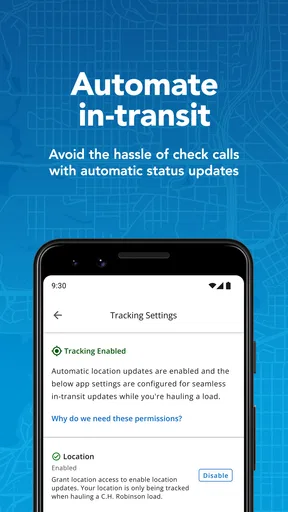
The application is designed to support shipment visibility and communication throughout the transportation process. Depending on the shipment and account setup, users may be able to provide status updates, share location information, review milestones, or communicate delays and delivery progress. Tracking accuracy can depend on device permissions, internet connectivity, GPS availability, and whether the driver or carrier completes the required in-app actions.
Is Navisphere Carrier free to download, and what does it require?
Navisphere Carrier is generally available to download without a separate app purchase, but access to its business functions requires an eligible carrier account and login. The app may need an internet connection, location services, notifications, camera access, or other permissions for features such as tracking, document handling, and communication. Mobile data usage and any carrier-related costs are the user’s responsibility.
